

Document & Receipt Processing
Extract useful information from receipts, documents, and images without forcing users to manually type every field. For workflows where accuracy matters, extracted results can be reviewed and corrected before use.
Practical AI Product Integration
I integrate AI into existing mobile and web products, connecting model outputs to real workflows, validated data, backend systems, and user-facing experiences.
The goal is never novelty for its own sake—it is automating friction points like document and receipt processing, structured data extraction, and semantic search.
Every integration is built with strong schema validation, deterministic fallback logic, and strict privacy controls so features remain dependable in daily production use.
Useful AI integrations, built into the products people actually use.

Practical use cases
AI is most valuable when it handles tasks that are difficult to solve with conventional code alone:
Extract useful information from receipts, documents, and images without forcing users to manually type every field. For workflows where accuracy matters, extracted results can be reviewed and corrected before use.
Turn natural-language input and unstructured text into consistent fields that your application can validate and process.
Let users interact with a specific product workflow using natural language when that approach is more useful than traditional forms or menus.
Help users find relevant information by meaning rather than relying exclusively on exact keywords.
Organize information, identify relevant categories, or produce focused summaries when the output requirements can be clearly specified.
Product evidence
These two products demonstrate practical AI integration within production and pre-release mobile applications:
Tare is a mobile habit reflection app that saves original check-ins, proposes structured fields for user review, and uses recorded history for progress views and insight paths.
Tare processes open-ended habit reflections into structured check-in data. The original reflection is saved first. AI-generated fields are then presented for review before the structured check-in is finalized. Engineering case study; listed on Google Play for Android. iOS release and released feature scope are unverified.
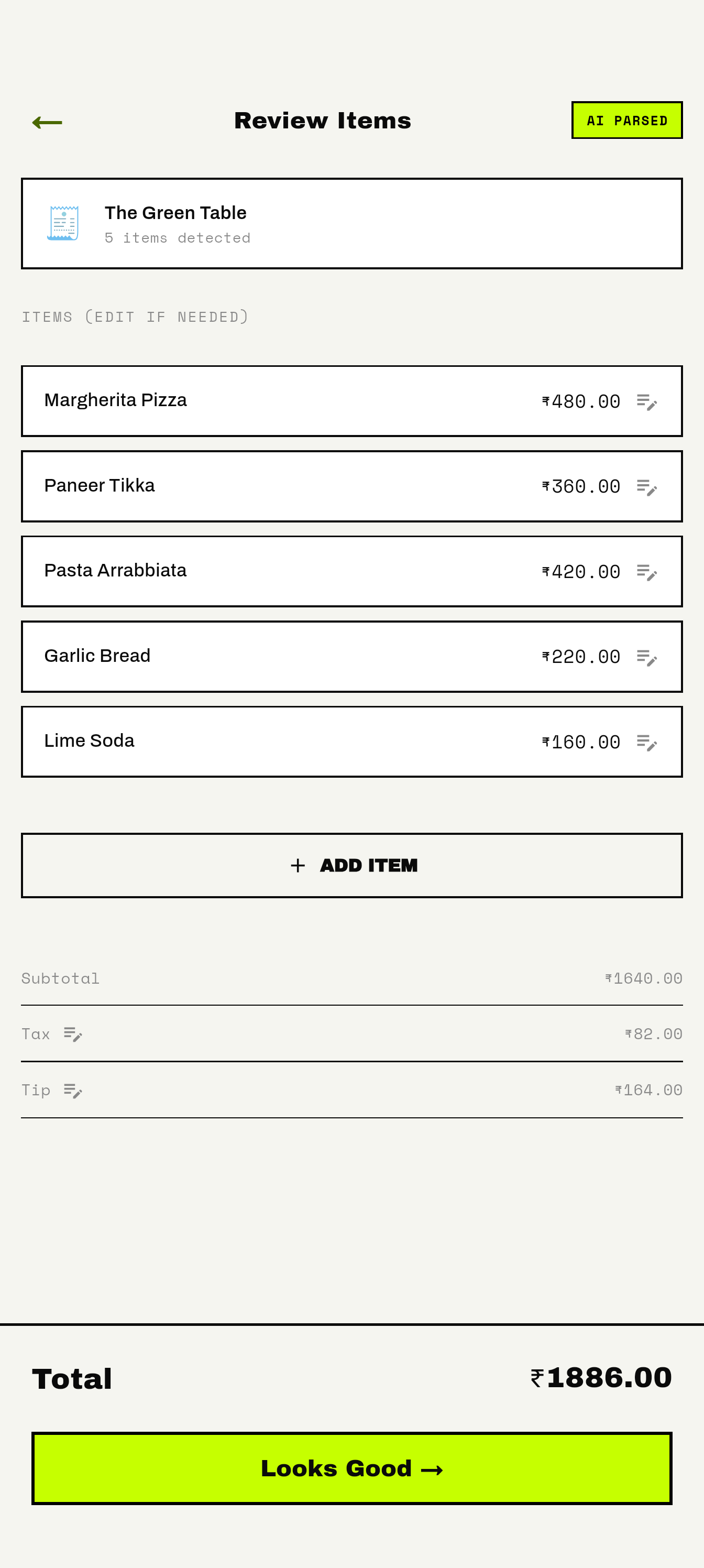
SettleTab is a live Android app for itemized shared bills. People can scan a receipt or enter items manually, correct the bill, assign individual and shared purchases, calculate what each person owes, and share a read-only result.
SettleTab uses optical character recognition to extract receipt line items, which users can review and edit before deterministic bill calculations are performed. Live on Google Play.
Integration capabilities
Building an AI feature that works reliably in production requires engineering across several areas:
Presenting model outputs clearly, supporting user review and editing, and designing clear fallback states when the model cannot produce a confident result.
Keeping API keys and credentials secure on the server, controlling access, and validating inputs before they reach the model.
Ensuring model responses conform to expected schemas, types, and business rules before they are stored or displayed to users.
Choosing models that fit the requirements of each task, managing token usage, and optimizing latency for responsive user experiences.
Production reliability
A model output is an input to your application, not the final authority. Reliable AI features require defensive engineering:
Model responses are checked against schemas and business rules before they become part of your application's data.
Timeouts, malformed responses, provider outages, and low-confidence outputs have explicit fallback behaviors.
Calculations, business rules, and permissions stay in standard application code, not in prompts.
For workflows with consequences, users see what the model proposed and can review, correct, or reject it before saving.
Sensitive data is kept within appropriate security boundaries, with clear decisions about what information is sent to third-party models.
Backend security boundary
Provider API keys and sensitive credentials belong server-side, never inside mobile or web client bundles.
Model requests pass through an authenticated backend boundary that enforces rate limits, validates payloads, and protects application data.
Cost & observability
Production design considers the work around each call without publishing arbitrary targets or treating one provider as universally best.
Use lightweight models for simple classification and extraction, reserving larger models for complex reasoning.
Design prompts and context windows efficiently to control ongoing API costs.
Implement streaming responses, optimistic UI updates, and asynchronous background processing where appropriate.
Track model error rates, schema violations, latency spikes, and provider outages with privacy-safe observability.
Text, images, or documents enter a defined product workflow.
Authenticate access and keep provider credentials server-side.
Check structure and constraints; give users a correction path where needed.
Keep calculations and business rules in deterministic application code.
Illustrative responsibilities, not a literal deployment diagram. Model output is an input to validate, not an authority.
Integration process
A structured process keeps AI features focused on real product value:
We define exactly what job the AI should perform, why conventional code isn't sufficient, and how success will be evaluated.
I map out the user interaction, determine where review or correction is needed, and design fallback behavior for failure cases.
I build the server-side architecture to manage model access, handle authentication, validate inputs, and process responses securely.
The feature is integrated into the mobile or web interface with clear loading states, editable results, and responsive interactions.
We evaluate the feature against messy inputs, unusual documents, network failures, and unexpected user behavior before release.
Engagement options
From workflow feasibility discovery to production Edge Function integration, engagements focus on tangible product value with reviewable AI output.
Practical AI workflows embedded into real mobile and web products: structured extraction, OCR, and reviewable intelligence.
Initial feasibility discovery and proof-of-concept sprint quoted based on model pipeline complexity and client backend architecture.
Frequently asked questions
Common questions about integrating AI into mobile and web products:
Yes, when the model supports a clear product requirement. I can integrate suitable model APIs and the backend workflow around them.
No. The model and provider should be evaluated against the task, required output, latency, and cost.
Yes. I work across mobile applications and the server-side components needed to support AI features.
I use appropriate validation, failure handling, and user correction paths based on the impact of the output.
Yes. These are a strong fit for workflows that turn unstructured information into validated product data.
Yes, when retrieval by meaning is useful for the product and the data access and evaluation requirements are clear.
Tell me what you're building, the workflow you'd like to improve, and what you're hoping to achieve.
I'll help you evaluate whether AI is the right tool and identify a sensible technical approach.
Or email hello@divweavers.com